> ## Documentation Index
> Fetch the complete documentation index at: https://docs.intelleap.app/llms.txt
> Use this file to discover all available pages before exploring further.
# Interface Mismatch
Testing always operates against a specific release.
If the release configuration changes after a Test Suite has been created, Testing automatically detects differences between the selected release and the current Test Suite.
When differences are detected, an **Interface Mismatch** notification appears.
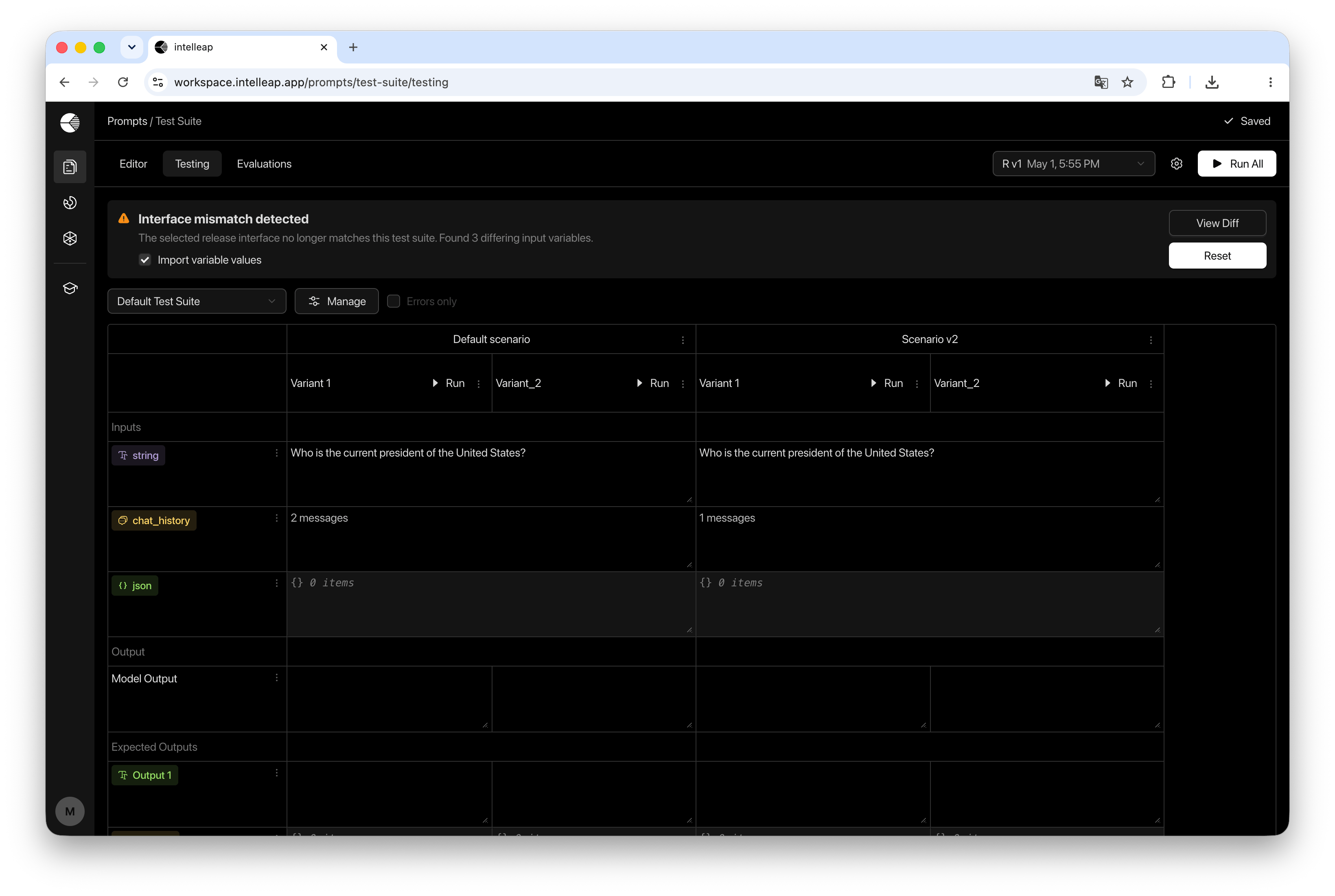 Interface Mismatch means the selected release and the current Test Suite no longer share the same structure.
## When a Mismatch Occurs
A mismatch occurs when the structure of the selected release no longer matches the structure used by the current Test Suite.
This can happen after publishing changes from the Editor, such as:
* Adding variables
* Removing variables
* Changing variable types
* Updating scenario structure
Until synchronization is performed, the Test Suite continues using its current configuration.
## Interface Mismatch Notification
When Testing detects differences between the selected release and the current Test Suite, an **Interface Mismatch** notification banner is displayed at the top of the page.
The notification shows the number of detected differences and provides actions for reviewing and applying changes.
Available actions include:
* View Diff
* Reset
The notification also includes the **Import Variable Values** option, which determines whether variable values should be imported from the release during synchronization.
## Reviewing Differences
Select **View Diff** to open the comparison dialog.
The dialog compares the interface defined by the selected release with the interface currently stored in the Test Suite.
Interface Mismatch means the selected release and the current Test Suite no longer share the same structure.
## When a Mismatch Occurs
A mismatch occurs when the structure of the selected release no longer matches the structure used by the current Test Suite.
This can happen after publishing changes from the Editor, such as:
* Adding variables
* Removing variables
* Changing variable types
* Updating scenario structure
Until synchronization is performed, the Test Suite continues using its current configuration.
## Interface Mismatch Notification
When Testing detects differences between the selected release and the current Test Suite, an **Interface Mismatch** notification banner is displayed at the top of the page.
The notification shows the number of detected differences and provides actions for reviewing and applying changes.
Available actions include:
* View Diff
* Reset
The notification also includes the **Import Variable Values** option, which determines whether variable values should be imported from the release during synchronization.
## Reviewing Differences
Select **View Diff** to open the comparison dialog.
The dialog compares the interface defined by the selected release with the interface currently stored in the Test Suite.
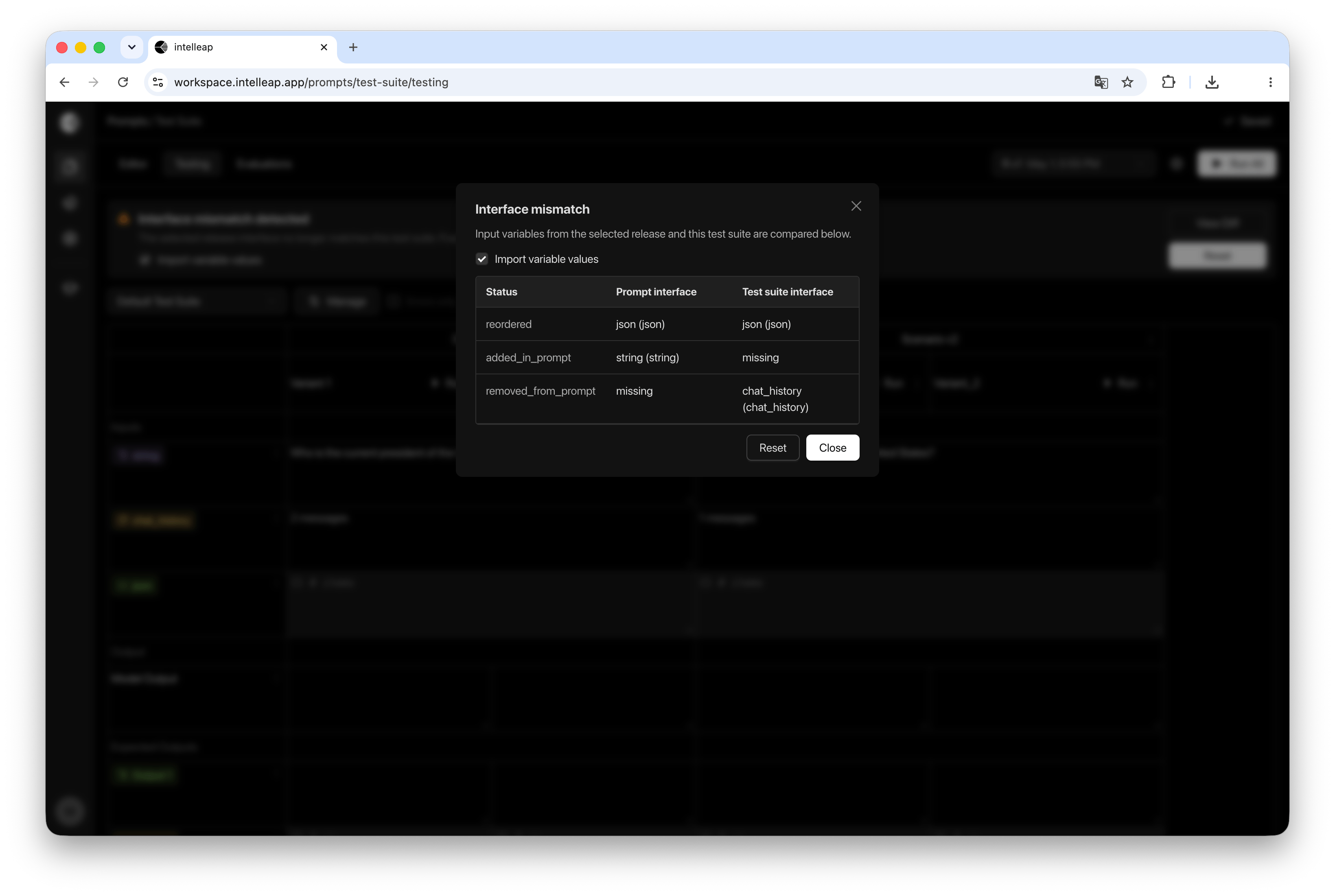 The comparison includes:
* Added variables
* Removed variables
* Variable types
* Missing entries
* Interface differences between the release and the Test Suite
Each change is displayed together with its status and source.
## Synchronizing a Test Suite
To apply changes from the selected release, click **Reset**.
Before synchronizing, choose whether variable values should also be imported from the release.
When **Import Variable Values** is enabled, Testing updates:
* Variable definitions
* Variable types
* Variable values
* Scenario configuration
This performs a full synchronization between the Test Suite and the selected release.
When **Import Variable Values** is disabled, Testing updates only the interface structure.
Existing variable values already configured in the Test Suite are preserved.
This option is useful when adopting interface changes while keeping the current testing dataset intact.
After synchronization is completed, the Test Suite uses the latest release structure.
## When to Delay Synchronization
Synchronization can be postponed if testing must continue using the current Test Suite configuration.
In this case, the Test Suite continues operating without applying changes from the release.
This can be useful when completing validation on an existing test dataset before moving to a newer prompt version.
## Best Practices
It is recommended to review and synchronize mismatches after publishing significant changes from the Editor.
Keeping Test Suites synchronized helps:
* Use the latest prompt configuration
* Maintain consistency between Editor and Testing
* Avoid issues caused by missing variables
* Produce reliable and reproducible test results
The comparison includes:
* Added variables
* Removed variables
* Variable types
* Missing entries
* Interface differences between the release and the Test Suite
Each change is displayed together with its status and source.
## Synchronizing a Test Suite
To apply changes from the selected release, click **Reset**.
Before synchronizing, choose whether variable values should also be imported from the release.
When **Import Variable Values** is enabled, Testing updates:
* Variable definitions
* Variable types
* Variable values
* Scenario configuration
This performs a full synchronization between the Test Suite and the selected release.
When **Import Variable Values** is disabled, Testing updates only the interface structure.
Existing variable values already configured in the Test Suite are preserved.
This option is useful when adopting interface changes while keeping the current testing dataset intact.
After synchronization is completed, the Test Suite uses the latest release structure.
## When to Delay Synchronization
Synchronization can be postponed if testing must continue using the current Test Suite configuration.
In this case, the Test Suite continues operating without applying changes from the release.
This can be useful when completing validation on an existing test dataset before moving to a newer prompt version.
## Best Practices
It is recommended to review and synchronize mismatches after publishing significant changes from the Editor.
Keeping Test Suites synchronized helps:
* Use the latest prompt configuration
* Maintain consistency between Editor and Testing
* Avoid issues caused by missing variables
* Produce reliable and reproducible test results