> ## Documentation Index
> Fetch the complete documentation index at: https://docs.intelleap.app/llms.txt
> Use this file to discover all available pages before exploring further.
# Execution Details
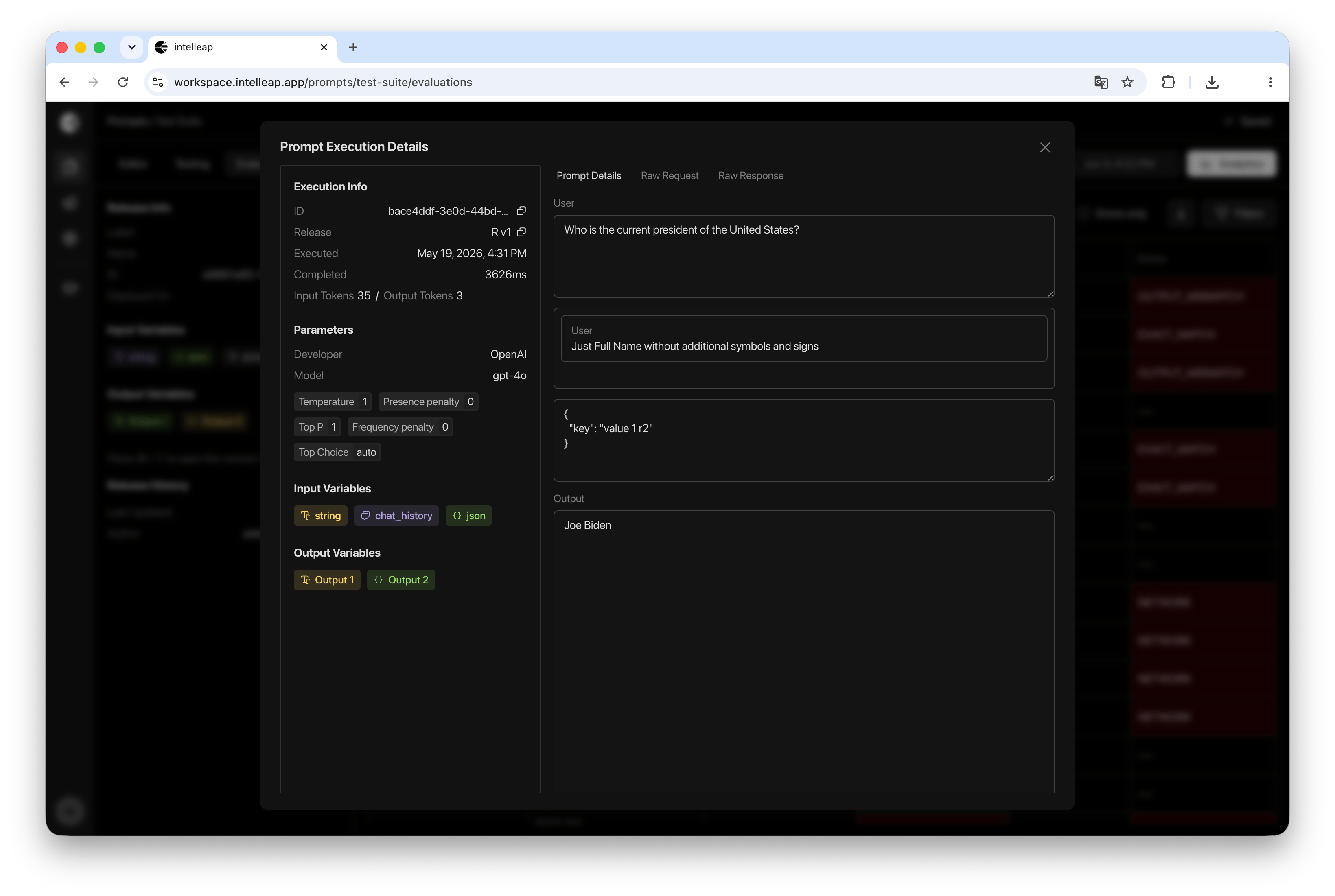
Execution Details provides a complete view of an individual prompt execution.
To open execution details, select any execution from the Evaluations table.
A modal dialog will open containing execution metadata, model configuration, variable references, and the raw execution payload.
 ## Execution Summary
The left panel displays a summary of the execution.
Available information includes:
* Execution ID
* Release
* Executed At
* Completed At
* Input Tokens
* Output Tokens
This information helps identify when the execution occurred and which release was used.
## Model Parameters
Execution Details includes the model configuration used during execution.
Displayed parameters include:
* Provider
* Model
* Temperature
* Top P
* Presence Penalty
* Frequency Penalty
* Top Choice
These settings make it possible to reproduce the execution environment and compare results across different configurations.
## Input Variables
The left panel also displays all input variables associated with the execution.
Variables are displayed as badges for quick reference.
This section helps identify which prompt inputs participated in the execution.
The actual variable contents are available in the Prompt Details and Raw Request tabs.
## Output Variables
Output variables associated with the execution are also displayed as badges.
This provides a quick overview of the outputs produced by the prompt.
The actual output data is available in the Raw Response tab.
## Prompt Details
The Prompt Details tab displays the prompt content that was used during execution.
Depending on the variable types included in the prompt, the tab displays the corresponding data that was provided to the model.
This view helps verify the final prompt configuration and confirm that execution occurred using the expected inputs.
## Raw Request
The Raw Request tab contains the request generated by Intelleap and sent to the model provider.
The request may include:
* Messages
* Variable content
* Model settings
* Execution parameters
This view is useful for debugging and understanding exactly what was sent to the provider.
## Raw Response
The Raw Response tab contains the complete execution result returned after processing.
Depending on the execution configuration, this view may include:
* Model output
* Execution status
* Metric results
* Execution metadata
* Diagnostic information
This allows users to inspect execution results without additional processing by the platform.
Review the rendered prompt content and variable data used during execution.
Inspect the payload generated by Intelleap and sent to the model provider.
Inspect the complete execution result returned after processing.
## Using Execution Details
Execution Details helps users:
* Investigate individual executions
* Validate prompt inputs
* Review provider requests
* Analyze model responses
* Troubleshoot unexpected results
* Review metric evaluation results
## Execution Summary
The left panel displays a summary of the execution.
Available information includes:
* Execution ID
* Release
* Executed At
* Completed At
* Input Tokens
* Output Tokens
This information helps identify when the execution occurred and which release was used.
## Model Parameters
Execution Details includes the model configuration used during execution.
Displayed parameters include:
* Provider
* Model
* Temperature
* Top P
* Presence Penalty
* Frequency Penalty
* Top Choice
These settings make it possible to reproduce the execution environment and compare results across different configurations.
## Input Variables
The left panel also displays all input variables associated with the execution.
Variables are displayed as badges for quick reference.
This section helps identify which prompt inputs participated in the execution.
The actual variable contents are available in the Prompt Details and Raw Request tabs.
## Output Variables
Output variables associated with the execution are also displayed as badges.
This provides a quick overview of the outputs produced by the prompt.
The actual output data is available in the Raw Response tab.
## Prompt Details
The Prompt Details tab displays the prompt content that was used during execution.
Depending on the variable types included in the prompt, the tab displays the corresponding data that was provided to the model.
This view helps verify the final prompt configuration and confirm that execution occurred using the expected inputs.
## Raw Request
The Raw Request tab contains the request generated by Intelleap and sent to the model provider.
The request may include:
* Messages
* Variable content
* Model settings
* Execution parameters
This view is useful for debugging and understanding exactly what was sent to the provider.
## Raw Response
The Raw Response tab contains the complete execution result returned after processing.
Depending on the execution configuration, this view may include:
* Model output
* Execution status
* Metric results
* Execution metadata
* Diagnostic information
This allows users to inspect execution results without additional processing by the platform.
Review the rendered prompt content and variable data used during execution.
Inspect the payload generated by Intelleap and sent to the model provider.
Inspect the complete execution result returned after processing.
## Using Execution Details
Execution Details helps users:
* Investigate individual executions
* Validate prompt inputs
* Review provider requests
* Analyze model responses
* Troubleshoot unexpected results
* Review metric evaluation results